
Accelerate your continuous improvement results
Download my free guide and start seeing better results today
Download my free guide and start seeing better results today
The 'MoLo' tool is a great way to brainstorm ideas with your team.
Simple choose one of the four options from the drop down menu (More, Less, Start, Stop) and brainstorm improvement opportunities with your team.
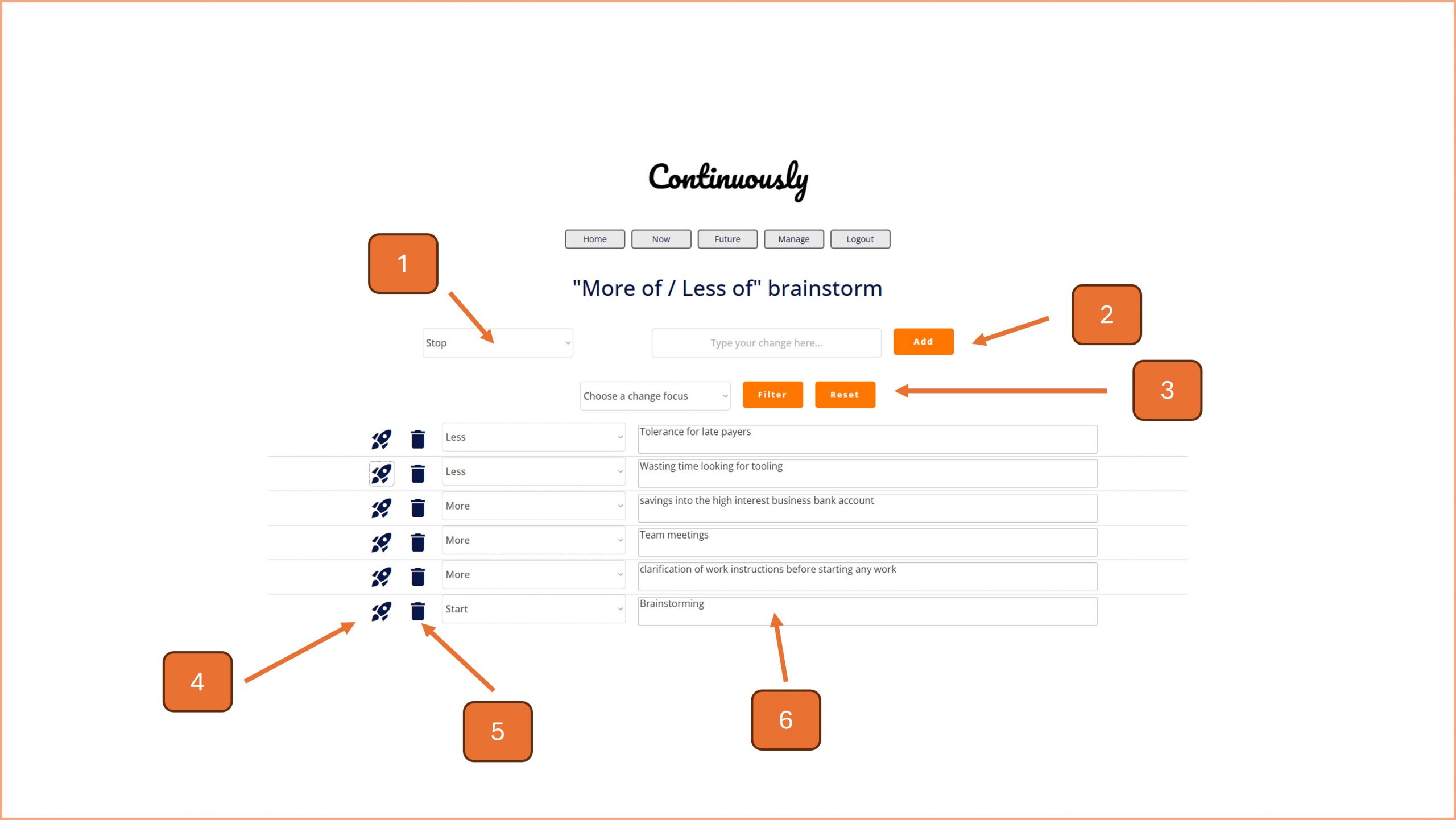
1. Choose an option from this drop down box (more, less, start, stop).
2. Brainstorm ideas with your team (you can narrow the focus as required) and type them into this input box, pressing Add when ready.
3. To filter the table of ideas at the bottom of the screen, choose a focus from the drop down box and press Filter. Click on the Reset button to show all ideas.
4. To create a task from a brainstormed idea, click on the rocket icon and complete the pop up window.
5. To delete a task, click on the bin icon and follow the on screen prompt.
6. You can update the brainstormed item by typing directly into the input boxes in the table. The changes save automatically.

© Smartspeed Consulting Limited. All Rights Reserved.